How to pay an exact XBT amount and bid smart on TideHash
Two things are new on the order form: you can pay an exact amount of XBT (Bitcoin Blake2b), and you can see what it takes to get hashrate first. Here is how to use both. All values in the screenshots are examples.
Pay an exact XBT amount
Step 1: Set your speed and price
Enter the speed in TH/s and your price per TH/s per day as usual. The live base price is shown in the top bar and under the price field. Prices are per TH/s per day, and the minimum order is $10.
Step 2: Open “Pay an exact XBT amount”
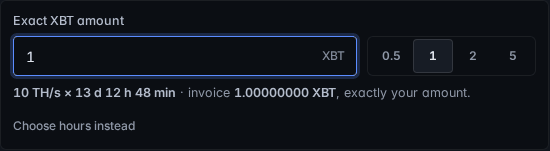
Under Speed and Duration, click “Pay an exact XBT amount” and type the XBT you want to spend, or tap a quick pick (0.5, 1, 2 or 5 XBT). The form keeps your speed and price and works out the duration for you.
Step 3: Check the result and pay
The form shows speed × duration and the invoice, for example 10 TH/s × 13 d 12 h 48 min, invoice 1.00000000 XBT. Choose XBT as the payment method and send exactly that amount to the new address shown for your order. The minimum order, the 720-hour maximum and the first-order discount are all taken into account. Want to pick hours yourself again? Click “Choose hours instead”.
The XBT amount is worked out at the live XBT rate, the same one the top bar shows. If the rate moves in the moment you submit, the order shows the exact invoice amount to send.

Bid smart
Step 4: Read the top bid
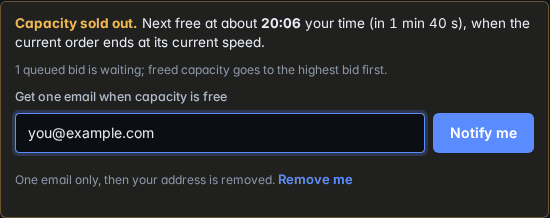
Above the order book, a strip shows the top bid, how many orders are running and queued, and either how much speed is free now or that capacity is sold out. When it is sold out, it counts down to when the next order is expected to end at its current speed.

Under the price field, the bid hint turns this into a number: the price to be next in line, and the price to be the top bid. Click “Use” to put that price in the form. Higher bids are served first, so bidding higher gets you hashrate directly.

Step 5: Outbid emails and the waitlist
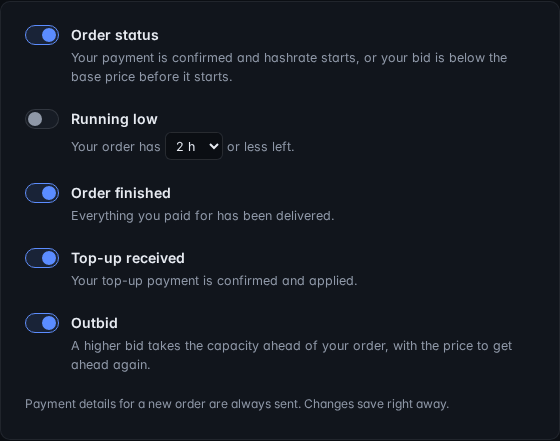
If a newer, higher bid takes the capacity ahead of your order, we send you one email with the price to get ahead again. You can then raise your price from your private order link, or do nothing: your order keeps every TH-hour you paid for and simply runs longer. Outbid emails are on by default; you can switch them off with the link in any order email or on your account page.
When capacity is sold out, the order form shows when the next capacity is expected and a waitlist box. Leave your email and you get one email when capacity frees up; then your address is removed.
Questions
Can I pay exactly 1 XBT?
Yes. Type 1 in the “Pay an exact XBT amount” box (or tap 1). The form keeps your speed and price and sets the duration so the XBT invoice equals 1.00000000 XBT.
What if the amount needs more than 720 hours at my speed?
The longest order is 720 hours. If the typed amount would need more time at your speed, the form tells you and offers a speed that fits, with one click.
What happens to my order if I am outbid?
A higher bid gets free hashrate first. Your order keeps every TH-hour you paid for: it runs at lower speed or waits in the queue and simply finishes later.
How often do waitlist emails come?
Once. You get one email when capacity frees up, then your address is removed from the waitlist. You can also remove it yourself with “Remove me”.
All changes are listed in the changelog. For the basics, see how to rent Blake2b hashrate and paying with XBT.
Ready to try it? Open the order form. Questions? Ask in our Discord.