Supplier setup guide: connect your Blake2b miners to TideHash, one worker per rig
This guide is for partners who supply Blake2b hashrate to TideHash, where renters buy hashrate for Bitcoin (XBT). It walks through connecting your ASIC miners, naming each rig, checking that every rig is seen and sold, setting your prices, and adding a backup and a payout address. Everything below matches what the TideHash stratum server and the supplier page do today.
The one rule: every rig gets its own worker name: name.rig1, name.rig2, name.rig3 and so on. Never use one worker name for several rigs, and never use a proxy or gateway that merges rigs into one connection.
Why one connection per rig
TideHash sells whole stratum connections to renters’ orders, never part of one. Each rig that connects directly has its own connection, so your rigs can go to different orders at the same time, and more of your hashrate gets sold.
A proxy or gateway that merges several rigs turns them into one large connection. That connection goes whole to an order large enough to take it. If no order is that large, it stays unsold and mines to your own pool, if one is set for you, or to the TideHash pool. You are owed only for hashrate delivered to renters who have paid, so unsold time is not owed.
Orders are filled as close to their ordered speed as whole connections allow. Supplier hashrate never fills an order more than 5% over its ordered speed, as TideHash measures it. A connection that would take an order past that goes to another order that still needs hashrate, or stays unsold and mines to your own pool, if one is set for you, or to the TideHash pool. Smaller, separate connections fit orders of more sizes than one large one does.
Why a separate name for each rig, if connections are what get sold? Because your supplier page lists your hashrate by worker name. With one name per rig, every rig gets its own row with its status, Serving value, shares and uptime. With a shared name, several rigs collapse into one row, and you can’t tell which one stopped. The FAQ on how hashrate is split has the short version.
Not sure a machine hashes Blake2b? Check its page in our Blake2b miners list before you connect it.
Step 1: Sign up and get your supplier link
Sign up on the supplier sign-up page: choose your worker name and enter your email, then open the confirmation link TideHash sends you. The worker name can’t be changed later. Questions first? Email info@tidehash.com or ask in our Discord. You then have:
- A worker prefix: the worker name you chose, your name on the TideHash stratum, for example
northfarm. Every rig’s worker name starts with it. - A private supplier link: your supplier page, with your rigs, Serving status, prices and payouts. It is shown once after you confirm, so save it. Treat it like a password, because anyone who has the link can open your page.
New hashrate starts in a test period. TideHash measures it first, and nothing is sold until it has passed. Your page shows “In test period” or “Test period: not sold yet” until then.
Step 2: Point your miners at TideHash
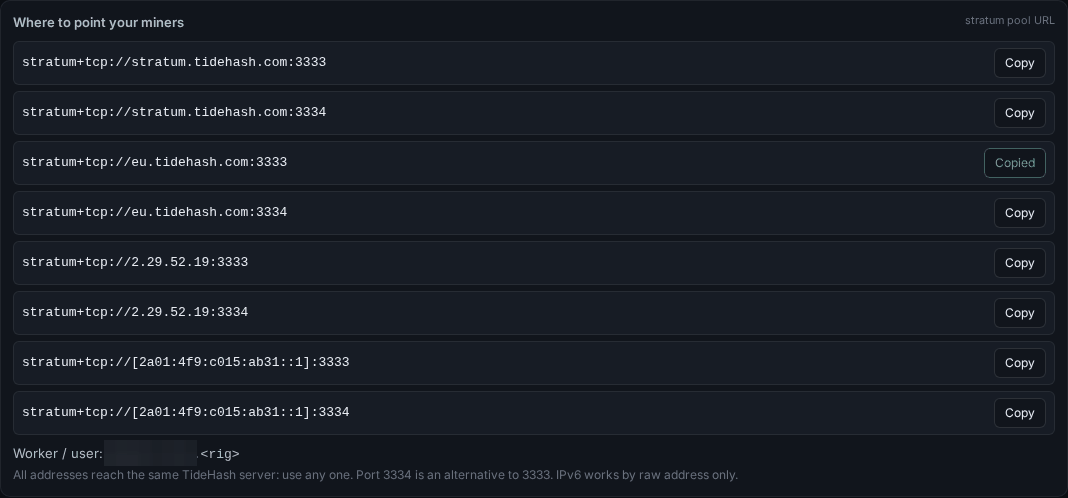
Your supplier page has a card called Where to point your miners with a Copy button on each address. These are the addresses:
| Address | Port 3333 | Port 3334 |
|---|---|---|
| stratum.tidehash.com | stratum+tcp://stratum.tidehash.com:3333 | stratum+tcp://stratum.tidehash.com:3334 |
| eu.tidehash.com | stratum+tcp://eu.tidehash.com:3333 | stratum+tcp://eu.tidehash.com:3334 |
| IPv4 address | stratum+tcp://2.29.52.19:3333 | stratum+tcp://2.29.52.19:3334 |
| IPv6 address | stratum+tcp://[2a01:4f9:c015:ab31::1]:3333 | stratum+tcp://[2a01:4f9:c015:ab31::1]:3334 |
- All eight reach the same TideHash server. Use any one.
eu.tidehash.comis another name for the same server, not a separate region. - Port 3334 is the same service as 3333. It is forwarded to the same stratum port, with the same behaviour. Use it if your network or firewall blocks 3333.
- Plain stratum over TCP, no TLS. Use
stratum+tcp://. Astratum+ssl://address will not connect. - IPv6 works by raw address only. The host names have no IPv6 record, so on an IPv6-only network use
stratum+tcp://[2a01:4f9:c015:ab31::1]:3333. - If your miner’s form has separate host and port fields, enter the host (for example
stratum.tidehash.com) and the port (3333) withoutstratum+tcp://.
Step 3: Worker and password for each rig
In each miner, enter the pool address from Step 2, then the worker and password:
- Worker (user): your prefix, a dot, then a rig name that is unique to that rig:
<prefix>.<rig>. The prefix is not case-sensitive. Use short rig names with letters, digits or dashes, and never give two rigs the same one. - Password: TideHash doesn’t check it. Enter
x(any value works).
Example for a partner with the prefix northfarm and three rigs:
| Rig | Pool URL | Worker | Password |
|---|---|---|---|
| Rig 1 | stratum+tcp://stratum.tidehash.com:3333 | northfarm.rig1 | x |
| Rig 2 | stratum+tcp://stratum.tidehash.com:3333 | northfarm.rig2 | x |
| Rig 3 | stratum+tcp://stratum.tidehash.com:3333 | northfarm.rig3 | x |
A worker that doesn’t start with your prefix and a dot isn’t linked to your account: it won’t show on your page and isn’t counted for you.
Step 4: Check each rig and its Serving status
Give the rigs a few minutes, then open your supplier page. The Rigs table (called Your rigs on the beta page) should have one row per rig:
- Online: a green dot or “online” means the rig is sending accepted shares. “Last seen” or “Last share” shows when TideHash last heard from it.
- ×2, ×3 after a rig name: that many connections use the same worker name. Give each rig its own name.
- Rejected and Reject %: shares TideHash didn’t accept, stale shares included. A rig that rejects much more than the others usually has a network or configuration problem.
The Serving column shows what each connected rig is doing right now:
| Serving | What it means |
|---|---|
| sold to a renter | The rig’s hashrate is sold right now. |
| unsold → your pool | Not sold right now; it mines to your own pool. |
| unsold | Not sold right now; it mines to the TideHash pool. |
| — | The rig isn’t connected right now. |
The chips at the top of the page sum it up: “Serving renters” or “Test period: not sold yet”, and “Unsold → your pool” or “Unsold → TideHash” (on the beta page: “Test period passed · selling” or “In test period”, and how many rigs are online). What is sold is the hashrate TideHash measures from accepted shares at its stratum, not the rate your miner advertises.
Step 5: Set your asking price and per-rig prices
The Your asking price card sets the minimum, in USD per TH per day, that your rigs sell at. Your rigs only serve renters paying at least that. When no renter does, your hashrate isn’t sold and mines to your own pool or the TideHash pool.
- Type your price in Your asking price. The note under the field shows the allowed range and how often you can change it.
- Press Save price (on the beta page, Save). On the beta page you can also choose Effective from: Now, or Later… to schedule a change.
- Or press No minimum, which lets your rigs serve any renter.
Every change to your asking price is listed under Price history (beta page: Your changes).
Each rig can also have its own price. On the beta page, the Your rigs table has a Your ask column with a field for every rig: type that rig’s price and press Save; you can change it there later the same way. A rig with its own price is sold only to renters paying at least that. Leave the field empty, or press use default, and the rig uses your asking price. For a rig that hasn’t connected yet, use Set an ask for a rig that is not listed yet under the table.
Step 6: Backup pool, payout address and payouts
A backup pool in each miner
Most ASIC miners take two or three pools and switch to the next one only when the first can’t be reached. A good setup is pool 1 stratum+tcp://stratum.tidehash.com:3333, pool 2 stratum+tcp://2.29.52.19:3334 (same server, but no DNS and a different port), and pool 3 your own pool. While a miner is on pool 3, its hashrate isn’t on TideHash and isn’t sold.
Your DATUM endpoints for unrented hashrate (beta page)
The card Backup for unrented hashrate: your DATUM endpoints takes up to three of your own DATUM gateways (host:port, worker and password), priority 1 first. Your DATUM gateway picks the pool. TideHash servers and public pool addresses are not accepted. Own-pool DATUM backup routing is live for suppliers (enabled 3 Nov 2026). See the DATUM gateway guide for running a gateway.
Payout address (XBT)
On the beta page, the Payout address (XBT) card takes the address your payouts go to:
- Use a mainnet address (
bc1q…,bc1p…,1…or3…) from a wallet you control, set up for the XBT chain. Testnet addresses are refused. - A new address becomes active 72 hours after you save it at the earliest, and only after TideHash has confirmed it with you through a second channel, never through the link itself. Payouts pause until it is active.
Payouts are in beta. Your page shows whether they are enabled for you, the amount owed for hashrate delivered to renters who have paid, the hold period, the minimum payout, and every payout sent with its transaction. Read the XBT explainer if you are new to the chain.
Common mistakes
- One worker name on several rigs. The page shows a single row marked ×2 or more, and you can’t see which rig has a problem.
- A farm proxy or gateway in front of the rigs. It merges them into one connection, which only goes to an order large enough to take all of it.
- A typo in the prefix, or no dot. The rig isn’t linked to your account. If your page says “No rigs have connected with your worker prefix yet”, check the worker field first.
stratum+ssl://or a TLS option. TideHash stratum is plain TCP on both ports.- A host name on an IPv6-only network. Use the bracketed IPv6 address instead.
- Expecting sales during the test period. Nothing is sold until the test period has passed.
- A testnet or exchange deposit address for payouts. Use a mainnet XBT address from a wallet you control.
- Sharing your supplier link. Keep it private. On the beta page, “forget this link” removes it from a shared browser.
Want to supply hashrate to TideHash?Sign up with your worker name and email to get your supplier link. Questions? Ask in our Discord.
Sign up as a supplierQuick FAQ
Can several rigs share one worker name?
Please don’t. Each rig that connects directly is still its own connection, but your supplier page then shows them as one row (marked ×2, ×3 and so on), so you can’t see which rig is offline or rejecting shares. Give every rig its own name: name.rig1, name.rig2.
Can I use a proxy or gateway in front of my rigs?
Not for the hashrate you send to TideHash. A proxy or gateway that merges rigs sends them as one connection, and TideHash sells whole connections only, so that connection can only go to an order large enough to take all of it. Connect each rig directly.
Is port 3334 different from 3333?
No. Port 3334 is forwarded to the same stratum service as 3333 on the same server. Use 3334 when a network or firewall blocks 3333.
Does TideHash support stratum over TLS?
No. Both ports speak plain stratum over TCP, so use stratum+tcp:// addresses, not stratum+ssl://.
What happens to hashrate that isn’t sold?
It stays connected and mines to your own pool if one is set for you, or to the TideHash pool. You are owed only for hashrate delivered to renters who have paid, so unsold time is not owed.
Can an order take more of my hashrate than it ordered?
Not more than 5% over its ordered speed, as TideHash measures it. A connection that would take an order past that goes to another order that still needs hashrate, or stays unsold and mines to your own pool, if one is set for you, or to the TideHash pool.
How do I sign up as a supplier?
On the supplier sign-up page: choose your worker name, enter your email and open the confirmation link. Then save your private supplier link and point your rigs at TideHash, one worker name per rig.
Renting hashrate instead? Start here, or read pool settings that work and which Blake2b miners work for XBT.