Your first TideHash order: what happens
A plain walk-through of a first order for Bitcoin (XBT): what you pay, where the hashrate goes, when it starts, how to watch it and what happens if something goes wrong. No account is needed.
Step by step: the order form in pictures
These pictures show the real order form and order page, filled in with example values. The numbers in each picture match the steps below it.
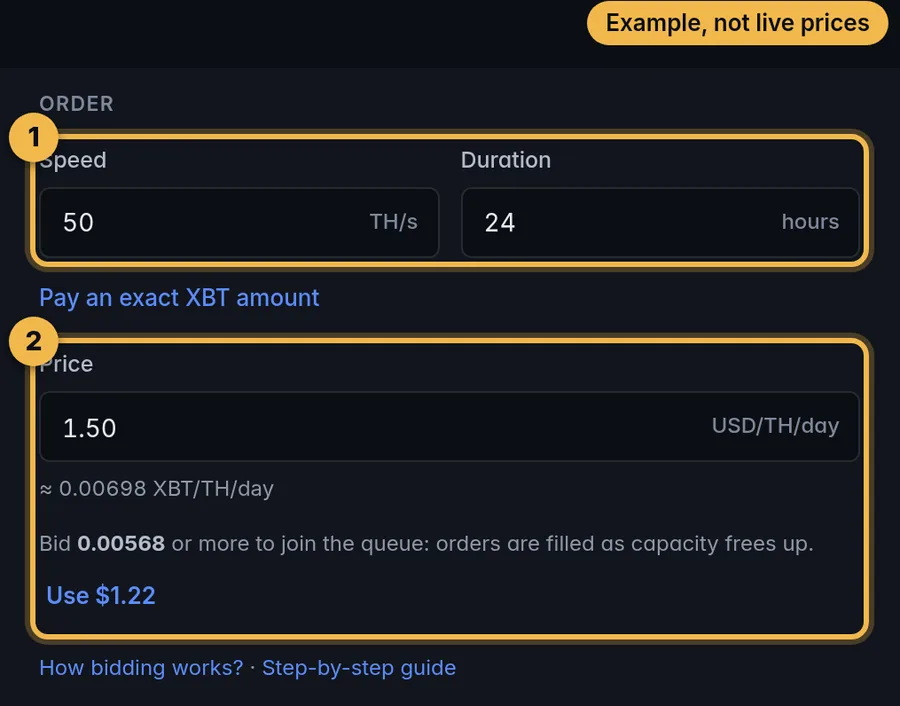
- Speed and durationEnter how many TH/s you want and for how many hours.
- Price: your bidYour price per TH/s per day. The lowest allowed bid is the current base price, shown next to the form; a lower bid is refused when you submit. While capacity is free, paid bids at or above the base price are normally filled. When capacity is sold out, higher bids are filled first and lower ones wait in the queue. How bidding works
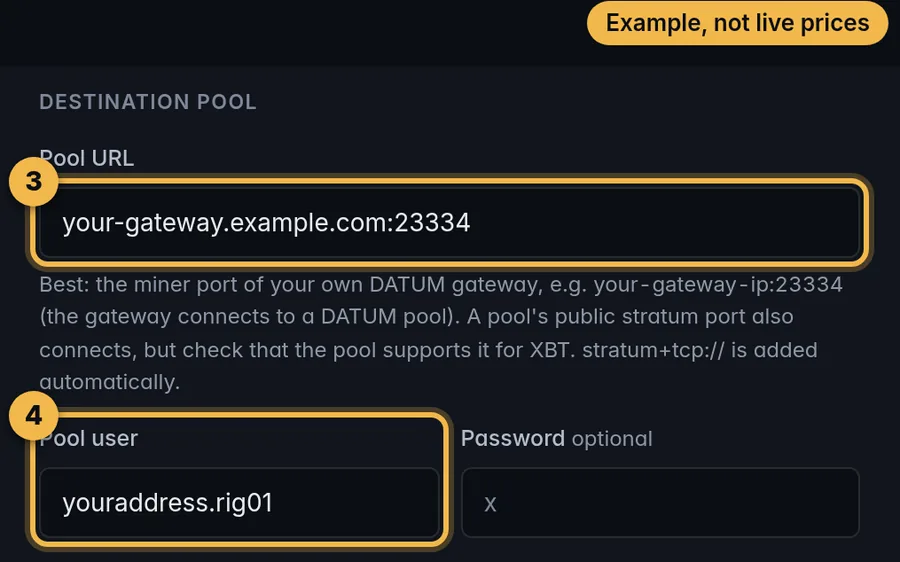
- Pool URLThe miner port of your own DATUM gateway (recommended), or an XBT pool’s host and port. stratum+tcp:// is added automatically.
- Pool userUsually your XBT address plus a worker name, for example
address.rig01. The password is optional.
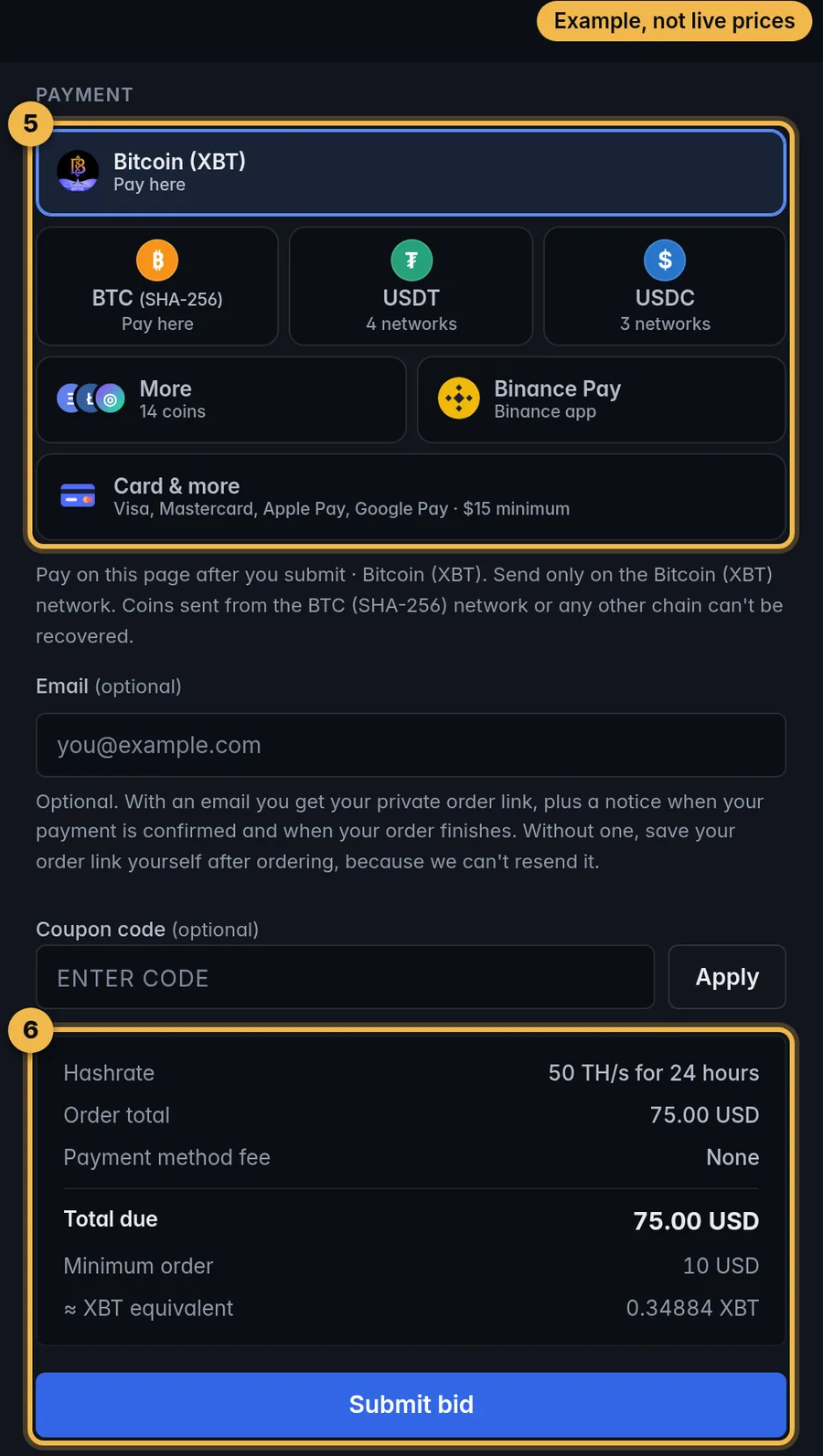
- Payment methodPick how you pay. The note under the form says where: XBT and BTC on this page, USDT, USDC and the other coins on a secure payment page, Binance Pay in the Binance app.
- Check the total, then “Submit bid”The box shows the hashrate, the order total, any payment method fee and the total due. Email and coupon are optional. “Submit bid” creates the order and opens its payment panel.
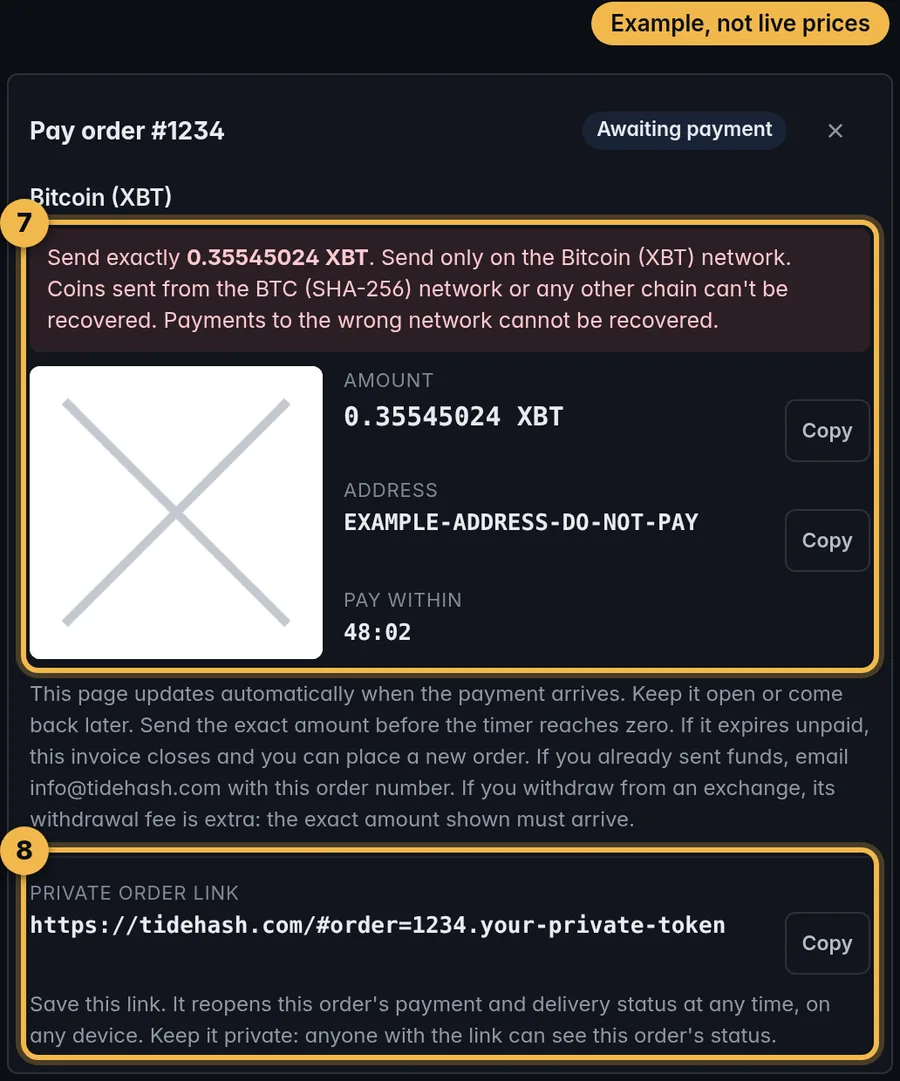
- Pay the exact amountSend exactly the amount shown, to the address shown, before “Pay within” reaches zero. If you withdraw from an exchange, its fee is extra: the amount shown must arrive in full.
- Save your private order linkIt reopens the order’s payment and delivery status at any time, on any device. Keep it private.
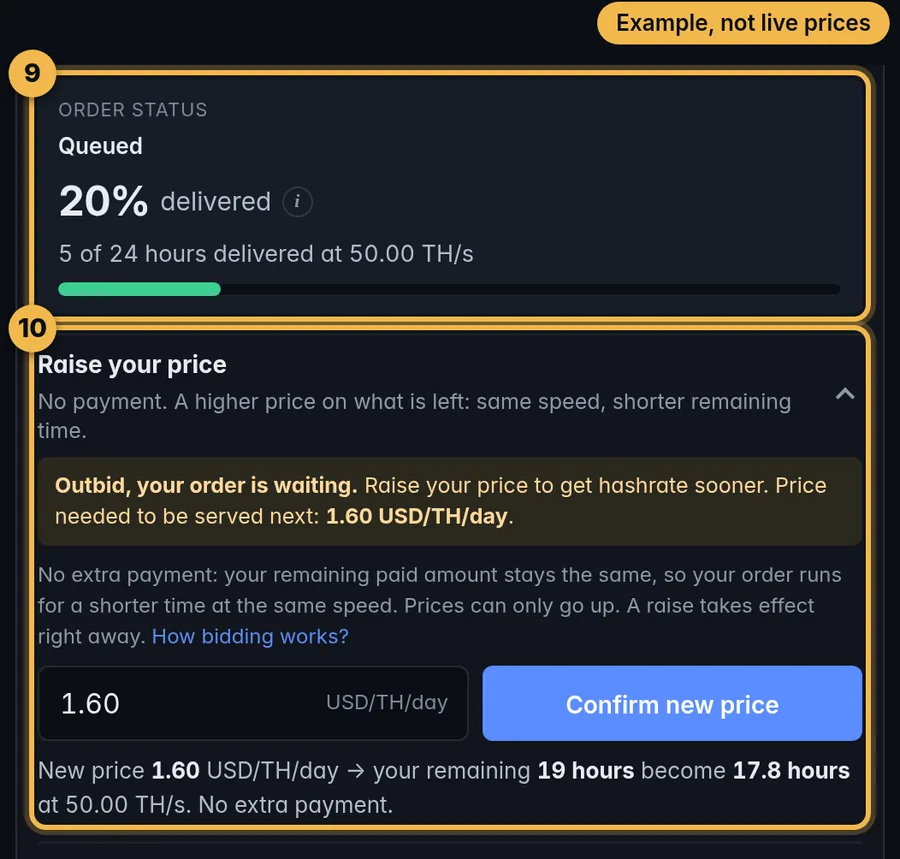
- Order statusOnce the payment is confirmed, the status shows “Running” (mining to your pool now) or “Queued” (paid, 0 TH/s right now, waiting for capacity at your price). A queued order normally starts by itself and keeps everything you paid for. If your pool can’t be reached, the order can’t run until your pool answers again. My rental shows your pool status.
- Raise your priceIf your order waits because it was outbid, this box shows the price needed to be served next. Enter a higher price and confirm. There is no extra payment: the order keeps its speed and runs for a shorter time. Prices can only go up, at most once every 10 minutes.
Lost the link? Open My rental and paste the wallet address from your pool user. Price raises and pool changes made there are confirmed by email.
The four stages in short
- Connect: choose where the hashrate goesEnter your own DATUM gateway's miner port (recommended) or an XBT pool's host and port, and your pool user, usually your XBT address plus a worker name. Before the order is sent, the form checks that the address answers like a mining pool. You can add a backup pool, which is used only if the main one can't be reached.
- Pay for that one orderSet speed, hours and your price per TH/s per day; the form shows the exact total and the minimum order. Then pay with XBT, BTC, USDT, USDC, other coins, Binance Pay or card. The page shows the exact amount, the address, a QR code and a timer. Pay that exact amount before the timer reaches zero. If you withdraw from an exchange, its fee is extra: the amount shown must arrive in full. Each payment covers one order.
- Hashrate startsOnce the payment is confirmed on its network, your order joins the live order book. While capacity is free, a paid bid at or above the base price is normally filled. When capacity is sold out, higher bids are filled first and lower ones wait in the queue until capacity frees up at their price. A bid below the base price is refused when you submit. If your pool can’t be reached, the order can’t run until your pool answers again. My rental shows your pool status.
- Watch it workYour private order link shows the status, live speed and work delivered, measured by the shares your pool accepts. Your worker also appears in your pool dashboard after its first accepted shares.
If your first order qualifies for a new-customer discount, the order form shows the exact amount before you pay.
Keep your order link
The private order link is how you check, change or top up your order. If you give an email (optional), we send you the link, a notice when the payment is confirmed and one when the order finishes. Without an email, save the link yourself, because it can't be resent. You can also find your orders with Look up your rental by pasting the wallet address from your pool user.
If the payment doesn't match
- Not paid: pay the exact amount shown before the timer on the payment panel reaches zero. If the timer expires unpaid, the order is marked "Not paid in time", this invoice cannot be reused, and it costs nothing. You can place a new order.
- Paid too little or too late: the order goes to "Needs review" and does not start by itself. Email info@tidehash.com with your order number. If you withdraw from an exchange, its withdrawal fee is extra: send enough that the exact invoice amount arrives.
- Paid more than asked: the extra becomes bonus time on the same order.
If the hashrate slows or stops
- Outbid: your order slows down or waits, keeps every hour you paid for and finishes later. You can raise your price from the order link.
- Your pool is unreachable: with a backup pool, the order keeps mining there and counts as delivered. Without one, it pauses, that time doesn't count against it, and it resumes on its own when your pool answers again. You can change the pool from the order link; the new pool is tested before the switch.
- Finished: the order ends when everything you paid for has been delivered.
Cancellation and refunds
There is no cancel button on the order page, and TideHash has no published refund policy. If something is wrong, email info@tidehash.com with your order number, or ask in our Discord.
More detail
- Rent Bitcoin (XBT) hashrate: what happens to your order, from payment to finish
- Pool settings that work: URL, user, password and backup pool
- Rent to your own DATUM gateway
- Start here: rent Blake2b hashrate in 3 steps
- When you can spend mined XBT: the 180-day coinbase maturity
Questions before your first order?Ask in our Discord or email info@tidehash.com.
Join the Discord